Raspberry Pi Pico and Zephyr USB networking: the code waits for its own flash
In the previous post we measured how three boards behave when a PC floods them with UDP echo requests over USB networking (CDC-ECM and CDC-NCM in Zephyr). One result did not fit: the Raspberry Pi Pico, at 125 MHz, answered every request only up to about 340 per second. The STM32F3DISCOVERY, at 72 MHz, reached 1330. A faster CPU was four times slower. This post finds the reason, step by step, and shows how large the effect is.
Short answer: the Pico runs the network and USB code from an external flash chip, through a 16 KB cache. The code that one echo needs does not fit in that cache, so each echo reloads about 18 KB of code from flash. Moved to on-chip SRAM as a test, the same code is four times faster. SRAM is too valuable for that in a real application, so the next question is whether a better layout of the code in flash can get most of the gain.
The three boards at their normal clocks
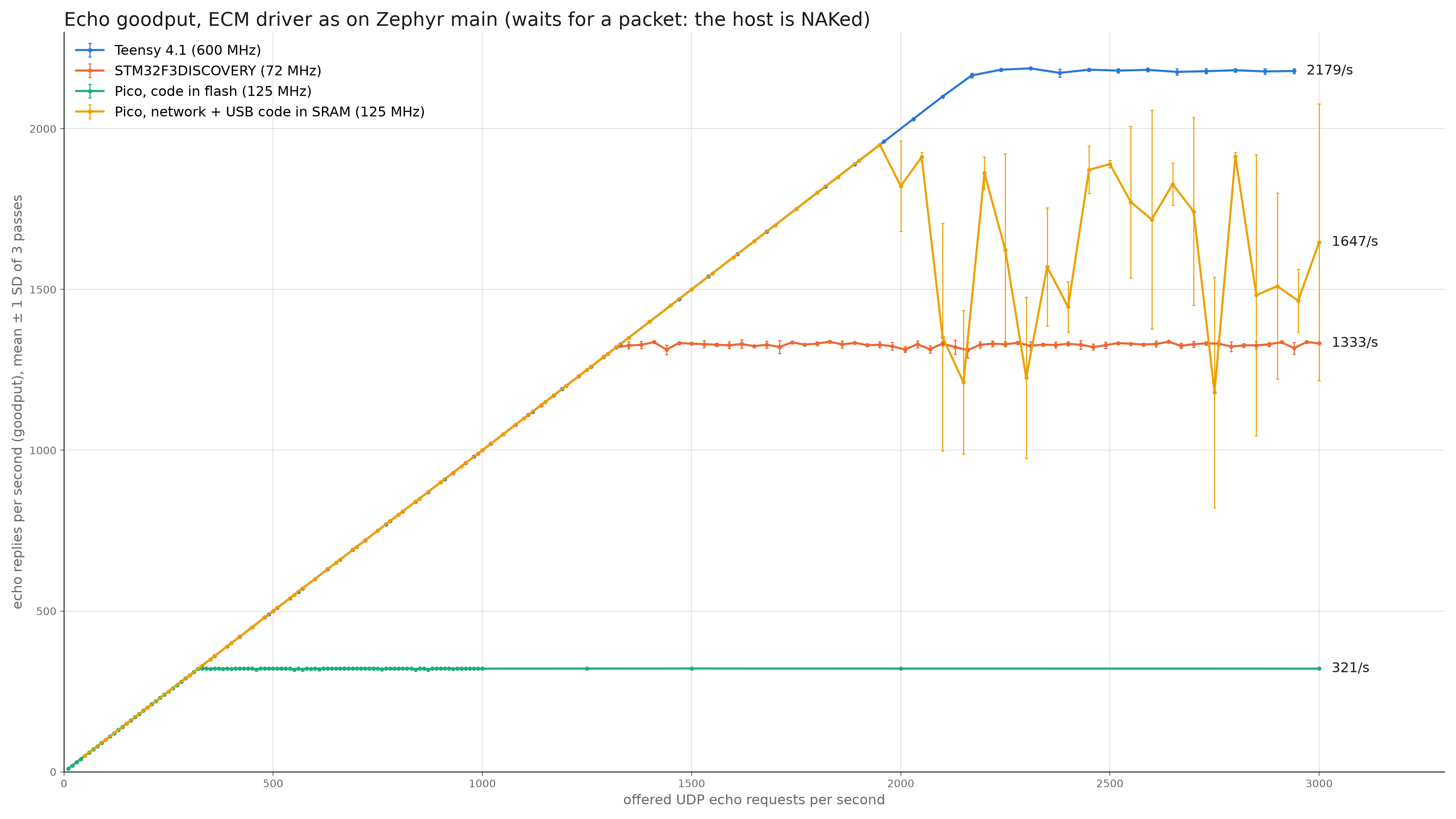
All three boards run the same Zephyr code: CDC-ECM as on the main branch, with a test application that echoes UDP. We measured two things. The PC's USB monitor (usbmon) shows when each USB transfer completes, so it gives the time that the board needs for one echo: from the end of the request transfer (OUT) to the end of the reply transfer (IN). The rate sweep gives the highest rate at which every request is answered (3 passes, mean ± 1 standard deviation).
| Board | CPU and clock | Where the code runs from | Time inside the board per echo | CPU cycles per echo | All replies up to |
|---|---|---|---|---|---|
| Teensy 4.1 | Cortex-M7, 600 MHz | external QSPI flash, 32 KB instruction cache | 0.19 ms | ≈ 116 000 | 2170 per second |
| STM32F3DISCOVERY | Cortex-M4, 72 MHz | on-chip flash, 2 wait states, prefetch buffer | 0.57 ms | ≈ 41 000 | 1330 per second |
| Raspberry Pi Pico | Cortex-M0+, 125 MHz | external QSPI flash, 16 KB XIP cache | 1.76 ms | ≈ 220 000 | 337 per second |
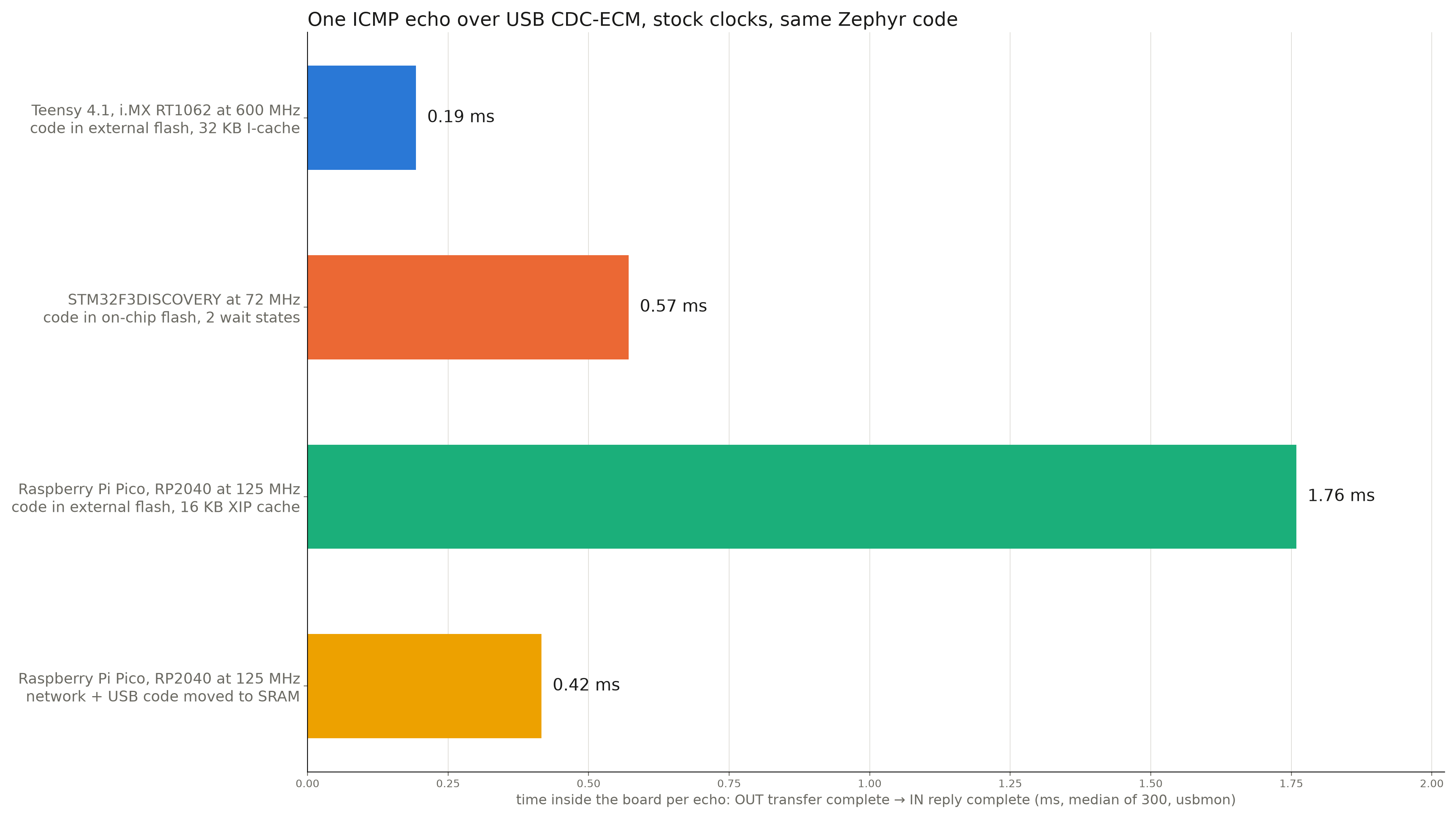
The Pico needs five times more CPU cycles per echo than the STM32F3. A Cortex-M0+ executes fewer instructions per clock than a Cortex-M4, but not five times fewer. Something else costs the time.
Step 1: the time is inside the board
The usbmon capture splits each echo into three parts: the time on the PC, the time to move the request over USB, and the time inside the board. The first two are the same on the Pico and the STM32F3 (the request takes 0.16 ms on the bus on both). The whole difference is inside the board. The same is true with CDC-NCM instead of CDC-ECM, so the USB class driver is not the cause. The USB hubs are not the cause either: all hubs on the path have one transaction translator per port.
Step 2: the time is in the network stack
We added time stamps at six points on the path inside the Pico: the USB interrupt, the USB driver thread, the class driver, the network stack's reply, the start of the reply transfer, and its end. The sum matches the usbmon result to within 1 µs. One stage takes almost all the time: from the class driver passing the request to the network stack, to the reply arriving back at the class driver, 1.37 ms of 1.89 ms (right panel below). The USB driver parts are small.
Step 3: the time is compute, not waiting
If the board waited for something outside the CPU, such as the bus, the PC or a timer, a faster clock would not help. If it computes, the time falls as 1/f. We ran the same image at 125, 150, 176 and 200 MHz. The fit is 91 µs + 1808 µs × 125 MHz / f: about 95 % of the time scales with the clock. The fixed 91 µs is the bus time of the reply.
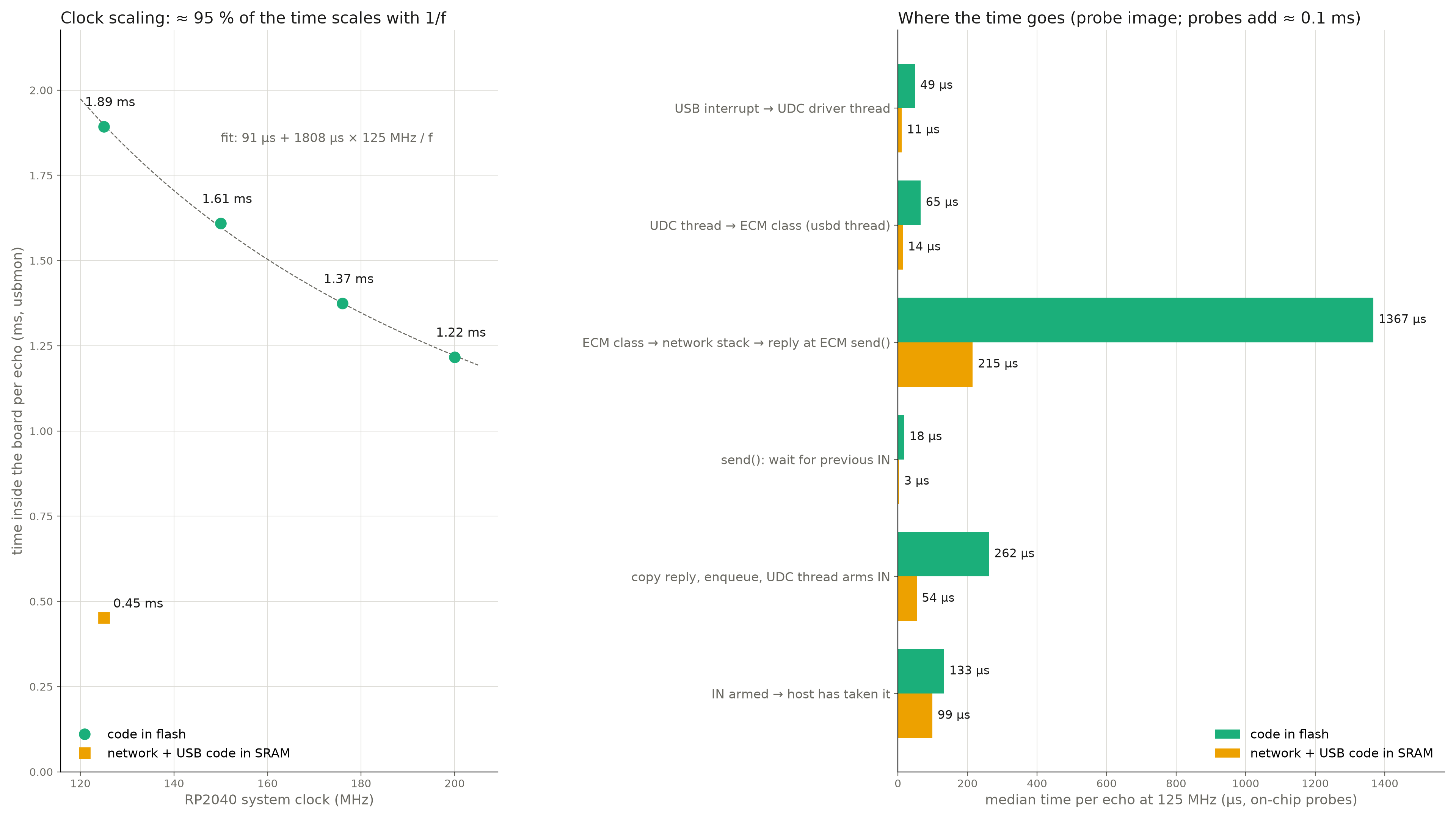
But "compute" on the RP2040 includes fetching the code. The RP2040 has no on-chip flash. Its program is in an external QSPI flash chip, read through a cache, and the flash clock is derived from the system clock. So a faster clock also makes flash reads faster, and this test cannot separate the two.
Step 4: the cache misses
The RP2040 executes code from flash through its XIP ("execute in place") cache: 16 KB, two-way set-associative, 8-byte lines, one cycle on a hit (RP2040 datasheet, section 2.6.3.1). On a miss, the cache reads the line from the flash chip over QSPI. The XIP block counts cache accesses and hits, and we read these counters over the debug port while the board ran:
| Code in flash | Network + USB code in SRAM | |
|---|---|---|
| XIP cache misses per echo | ≈ 2280 | ≈ 65 |
| Time inside the board per echo | 1.76 ms | 0.42 ms |
| CPU cycles per echo | ≈ 220 000 | ≈ 52 000 |
2280 misses of 8 bytes is about 18 KB of code read from flash for each echo, more than the whole cache. The time difference divided by the miss difference gives about 70 to 75 clock cycles per miss. Most of the Pico's time per echo is the CPU waiting for its next instructions.
The other two boards show why they do not have this problem. The STM32F3 reads its on-chip flash 64 bits at a time, with two wait states at 72 MHz and a prefetch buffer of two 64-bit blocks (STM32F303 reference manual RM0316, sections 4.1 and 4.2.2). Its worst case is a few cycles per jump, not 70. The Teensy also runs from external QSPI flash, but its cache is 32 KB and its CPU runs at 600 MHz. Even so, it needs about 116 000 cycles per echo, three times more than the STM32F3. This suggests that it also waits for its flash, and it will be part of the next study.
Step 5: the reference, code in SRAM
Zephyr can place selected libraries in SRAM: the code is copied from flash at boot and then runs from SRAM. The samples/net/zperf sample does this for the network stack to measure throughput. We placed six libraries in SRAM: the IP stack, the network core, Ethernet L2, net_buf, the USB device stack and the USB device driver.
- Time inside the board per echo: 1.76 ms → 0.42 ms. The Pico is now faster than the STM32F3 (0.57 ms).
- All replies up to 1950 per second instead of 337, the same in all three passes. Above that rate the result varies strongly from pass to pass (the error bars in the plot below); we have not analysed this yet.
- Cost: 49 KB more SRAM (35 KB → 85 KB of 264 KB).
Why SRAM is a reference, not the fix
49 KB of SRAM is about a fifth of the RP2040's memory, and an application usually needs that memory more than the network stack does: for buffers, for its own code and data, or for a second protocol. The RP2040's SRAM is also all equally fast. The six banks exist so that several bus masters can work in parallel (datasheet section 2.6.2), so there is no small "fast" region to give to the network code. The SRAM result shows what is possible: the upper limit of what better use of the cache can give.
Next: a better layout of the code in flash
The cache is 16 KB, and one echo reads about 18 KB of code. That is close. The code that one echo actually executes is probably much smaller than 18 KB: today, hot functions share cache lines and cache sets with code that never runs on this path, such as error handling and setup. If the hot functions are placed next to each other in flash, the working set of an echo may fit in the cache, and most of the misses may go away, without using SRAM. The plan:
- Find which functions one echo executes, in order. The M0+ has no trace hardware, but the same Zephyr code runs on
native_simon a PC, where the compiler can record every function call. - Place those functions together in flash with a linker section ordering, and measure the cache misses and the time per echo again, with the same counters and the same probes.
- Compare with the SRAM reference, and repeat the study on the Teensy, which also runs from external flash.
Update, 1 November 2026: the result is in the follow-up post, fixing the flash cache problem. (The function list came from sampling the program counter on the board itself, not from native_sim.)
If this works, it is a change that helps every RP2040 board that uses Zephyr networking, and it costs no RAM.
Method and limits
- One board of each type. ICMP echo with a 56-byte payload every 20 ms for the time per echo; UDP echo with a 32-byte payload for the rate sweeps. CDC-ECM driver as on Zephyr main.
- Time stamps and clock scaling used a separate test image with probes; the probes add about 0.1 ms. The table values come from images without probes.
- Images at 50 and 100 MHz stopped with a fatal error after USB start; we have not analysed this and stayed between 125 and 200 MHz.
- The cycles per miss are derived from the measured time and miss counts, not measured directly.